
Follow these steps to create your ID.iowa.gov account.
Enter First name
Enter Last name
Enter your email address
Choose an email address that you’ll always be able to access. Once your account is created, you can add an additional email address, such as a work email or alternate personal address, to access your account.Select the Sign-Up Button.
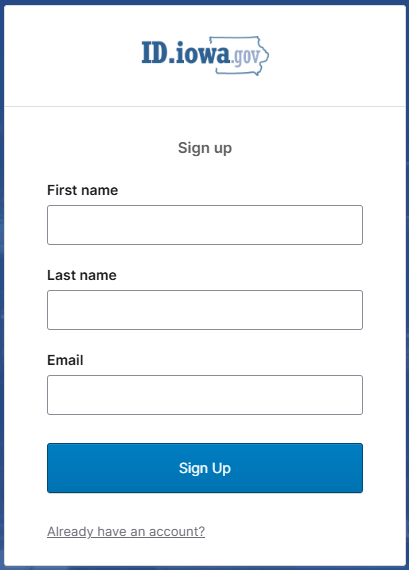
Note: If you get an error A user with this Email already exists then you already have an account. Select the Already have an account? link and use your email address to login.
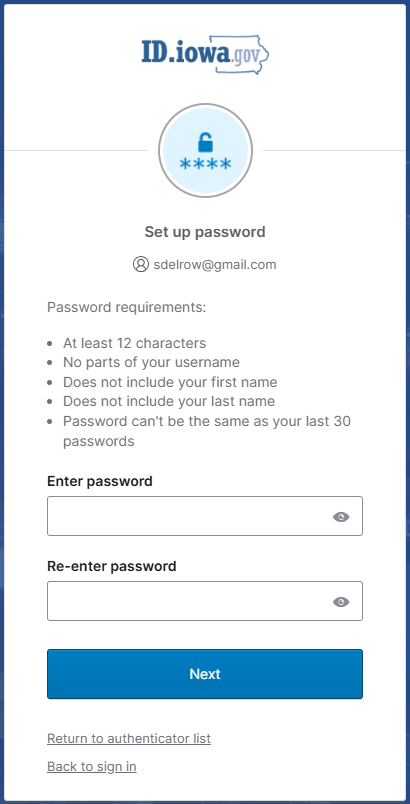
Create your ID.iowa.gov password.
Select Set Up
Password Requirements:
Passwords must be at least 12 characters and cannot contain part of your username, first name or last name. There are no other restrictions. You can use more than one word with spaces to get to 12 characters. Try using a phrase or a series of words that is unique to you.
NOTE: Your password should be different from passwords you use for other accounts such as your bank account or email. Using the same password for many accounts makes identity theft easier.Enter Password
Re-enter password
Check your email for new email containing a verification code
Did not receive verification code email or unable to complete your registration for some other reason? Please try again the following day or contact support.
Locate the verification code in your inbox
Go back to the ID.iowa.gov tab in your browser
Enter the verification code from your email in the Enter Code box
Select Verify
We encourage users to set up additional security methods with Authentication options. If you choose, you may follow these instructions or you may select Set up later.